Disclosure: This article contains affiliate links. If you click and sign up, AITechStackReview may earn a commission at no extra cost to you. We only recommend tools we have personally evaluated.
Quick Verdict
ChatBot.com is the most accessible no-code chatbot builder we've tested. The visual flow builder is genuinely intuitive, the AI responses are solid for handling common questions, and the integration with LiveChat makes the human handoff seamless. It's not the cheapest option in the category, but for businesses that want a reliable, professional chatbot without hiring a developer, it delivers.
Starting Price
$52
per month (annual)
Free Trial
14 days
no card required
Platforms
Web, FB, Slack
multi-channel
Our Rating
4.6/5
Best No-Code Pick
Our Rating Breakdown
| Category | Score | Rating |
|---|
| Ease of Use | 4.9 | |
| Bot Intelligence | 4.5 | |
| Integrations | 4.6 | |
| Value for Money | 4.3 | |
| Templates & Setup | 4.8 | |
What Is ChatBot.com?
ChatBot.com is a no-code chatbot platform that lets you build automated conversation flows for your website, Facebook Messenger, and Slack without touching a line of code. It's made by Text Inc., the same company behind LiveChat and HelpDesk, which means the products work together out of the box.
The core idea is simple: you build a conversation flow using a visual drag-and-drop builder, define what the bot says at each step, and connect it to actions like collecting a lead's email, checking an order status, or handing off to a live agent. The bot runs 24/7 answering questions your team would otherwise have to handle manually.
What makes ChatBot.com stand out from basic FAQ bots is the AI layer underneath. You don't just define exact-match keywords — the bot uses AI to understand variations of the same question. If someone types "when will my order arrive," "where's my package," or "track my shipment," the bot recognizes all three as the same intent and responds appropriately.

ChatBot.com's visual flow builder makes it easy to create conversation flows without code
Key Features
Visual Drag-and-Drop Flow Builder
The flow builder is the heart of ChatBot.com and it's genuinely easy to use. You drag conversation blocks onto a canvas, connect them with arrows, and define what the bot says at each step. Conditions, buttons, carousels, images, and form fields all snap together cleanly. You can see the entire conversation structure at a glance, which makes debugging and editing straightforward. Most basic bots take under an hour to build from scratch.
AI-Powered Intent Recognition
Beyond keyword matching, ChatBot.com uses AI to understand what a user means even if they don't phrase it exactly as you anticipated. You train the bot by adding example phrases for each intent, and the AI generalizes from there. In our testing, the intent recognition handled natural language variations well for common customer service scenarios. It won't replace a large language model for complex conversations, but for FAQ handling and lead qualification it's more than capable.
Seamless LiveChat Handoff
When a customer's question falls outside the bot's scope or they ask to speak to a human, ChatBot.com transfers the conversation directly to a live agent in LiveChat — with the full conversation history intact. The customer doesn't have to repeat themselves. This handoff is the smoothest we've seen in any chatbot platform, which makes sense given that both products are built by the same company and designed to work together.
Multi-Channel Deployment
You build your bot once and deploy it across your website, Facebook Messenger, and Slack. Each channel gets the same conversation flow. If you need channel-specific variations you can branch the flow at any point. For businesses that handle customer conversations across multiple platforms, this saves significant time compared to building and maintaining separate bots for each channel.
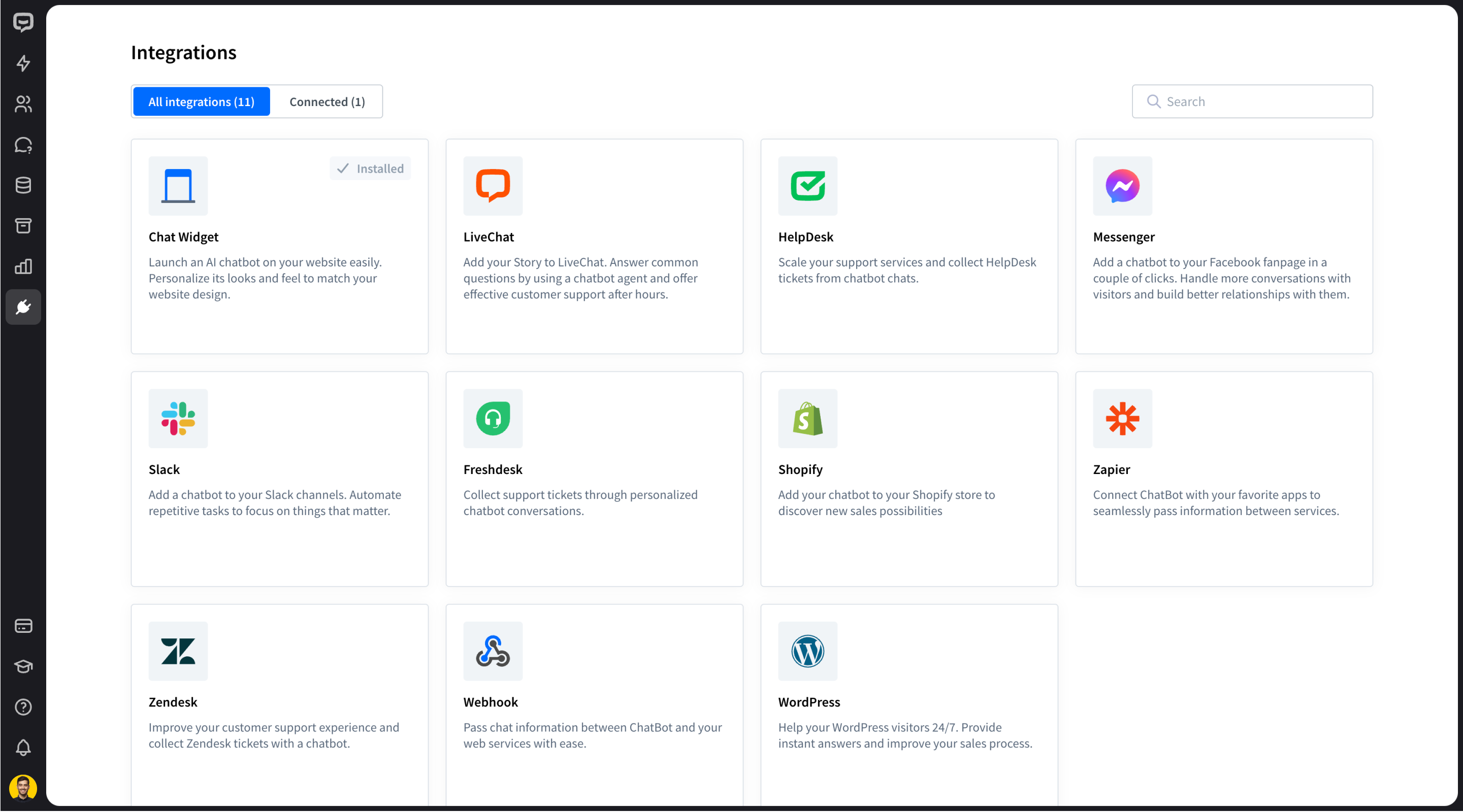
ChatBot.com integrates with LiveChat, Shopify, Zapier, Slack, and dozens of other tools
Templates for Fast Setup
ChatBot.com ships with a solid library of pre-built templates covering common use cases: lead generation, customer service, appointment booking, e-commerce FAQ, and more. Each template is a complete conversation flow you can customize rather than build from scratch. For most small businesses, a template gets you 80% of the way there in under 30 minutes.
Pricing
ChatBot.com pricing is based on the number of chats per month rather than per agent. Annual billing saves roughly 20%.
Starter
$52
per month (billed annually)
- 1,000 chats/month
- 1 active chatbot
- All channels
- Basic analytics
Team
$142
per month (billed annually)
- 5,000 chats/month
- Unlimited chatbots
- Team collaboration
- Advanced analytics
- LiveChat integration
Business
$424
per month (billed annually)
- 25,000 chats/month
- Unlimited chatbots
- Priority support
- Custom branding
- SSO and security
The Starter plan's 1,000 chat limit is tight for active businesses — if you're deploying on a busy website you'll hit it quickly. The Team plan at $142/month is more realistic for most small and mid-size businesses and unlocks unlimited bots, which matters when you want different bots for different pages or use cases.
What We Liked
- Visual builder is genuinely beginner-friendly
- AI intent recognition handles natural language well
- Seamless handoff to LiveChat agents
- Multi-channel from a single flow
- Strong template library for fast setup
- 14-day free trial, no card required
What Could Be Better
- Starter plan chat limit is low for busy sites
- Pricing jumps significantly between tiers
- Advanced AI responses need manual training
- Not a replacement for GPT-level conversational AI
Who Should Use ChatBot.com
Great fit for:
- E-commerce stores handling repetitive order questions
- Service businesses qualifying leads automatically
- Teams already using LiveChat who want bot automation
- Businesses wanting 24/7 coverage without extra staff
- Non-technical teams who need a bot without a developer
Not the best fit for:
- Businesses needing advanced GPT-style open-ended AI chat
- Very small businesses under 500 chats/month (cheaper options exist)
- Teams not using LiveChat who want a standalone solution
ChatBot.com vs The Alternatives
| Tool | Starting Price | No-Code Builder | AI Intent | Live Handoff | Best For |
|---|
| ChatBot.com |
$52/mo |
✓ Excellent |
✓ Strong |
✓ Native |
No-code automation |
| Intercom |
$39/seat/mo |
✓ Good |
✓ Very strong |
✓ Built-in |
Growth SaaS teams |
| ManyChat |
$15/mo |
✓ Good |
Basic |
Limited |
Social media bots |
| Tidio |
$29/mo |
✓ Good |
Moderate |
✓ Yes |
Budget-conscious |
| Drift |
Custom |
✓ Strong |
✓ Strong |
✓ Yes |
B2B sales teams |
Final Verdict
Our Verdict — Recommended
ChatBot.com is the best no-code chatbot builder for businesses that want reliable automation without technical complexity. The visual builder is the most intuitive in its class, the LiveChat integration is seamless, and the multi-channel deployment saves meaningful time. The pricing is on the higher side for lower chat volumes, but for businesses handling significant customer conversation volume, the automation ROI justifies the cost quickly. If you're already using LiveChat, adding ChatBot.com is a natural and easy next step.
Automate Your Customer Service Today
14-day free trial. No credit card required. Full access to all features.
Try ChatBot.com Free →
Frequently Asked Questions
How much does ChatBot.com cost?
ChatBot.com starts at $52 per month on the Starter plan (billed annually), which includes 1,000 chats per month and 1 active chatbot. The Team plan is $142/month for 5,000 chats. Enterprise pricing is custom.
Does ChatBot.com require coding?
No. ChatBot.com uses a visual drag-and-drop flow builder. You can build, test, and deploy a working chatbot without writing a single line of code. Templates make the process even faster.
Does ChatBot.com work with LiveChat?
Yes. ChatBot.com integrates directly with LiveChat, which is made by the same company (Text Inc.). The bot handles routine questions automatically and seamlessly transfers conversations to a live agent when needed.
What can ChatBot.com automate?
ChatBot.com can handle FAQs, lead qualification, appointment booking, order status checks, product recommendations, and customer feedback collection. It works across your website, Facebook Messenger, and Slack.
Is ChatBot.com good for e-commerce?
Yes. ChatBot.com has dedicated e-commerce features including product recommendation flows, abandoned cart messages, and order status integrations. It connects with Shopify and other platforms.
DH
Dana Hollis
Dana Hollis is a content strategist and AI writing tools specialist. She helps brands and creators integrate AI into their content workflows and has reviewed dozens of AI writing platforms since 2021.